Themes & auto换肤与跟随系统
Fuzzy-pick a theme with a live ANSI preview — prompt, eza, git diff, syntax, log colors — before you commit.模糊选主题,右侧真彩色预览提示符 / eza / git diff / 语法 / 日志标色,看准了再切。
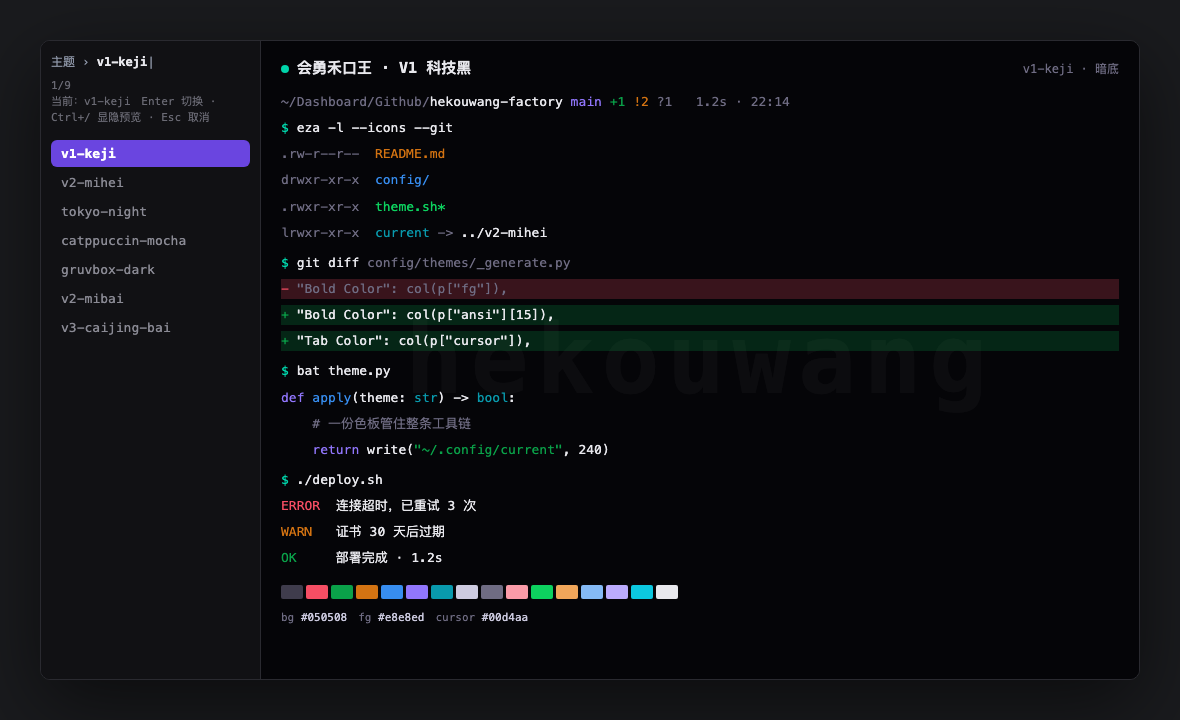
v1-keji). Needs fzf (brew install fzf); without it you get the text gallery../theme.sh — 左:fzf 列表 · 右:ANSI 整块预览(图为 v1-keji)。需安装 fzf(brew install fzf);没有则退回文字画廊。Fuzzy pick + live preview模糊选 + 实时预览
$ ./theme.sh                 # fzf + ANSI preview panefzf + 右侧 ANSI 预览
$ ./theme.sh --pick          # same, explicit同上,显式入口
$ ./theme.sh --list          # gallery only (no fzf)只要画廊(不进 fzf)
$ ./theme.sh tokyo-night     # switch by name按名切换
$ ./theme.sh --preview tokyo-night
$ ./theme.sh --gallery
In the picker: Enter applies · Ctrl+/ toggles the preview · Esc cancels. The preview is true-color ANSI — independent of your current theme — so what you see is what you get after the switch.选肤时:Enter 切换 · Ctrl+/ 显隐预览 · Esc 取消。预览是真彩色 ANSI,与当前主题无关 —— 看到的就是切过去之后的样子。
Open-source build ships three community schemes: catppuccin-mocha, tokyo-night, gruvbox-dark. Brand themes (V1 / V2 / V3, …) are in the paid pack — they still show up in the picker when you have the paid build.开源版自带三套社区主题:catppuccin-mocha、tokyo-night、gruvbox-dark。品牌主题(V1 / V2 / V3 …)在付费包 —— 装了付费档后也会出现在选肤列表里。
Follow system appearance跟随系统深浅色
Off by default. Turn on only when you want it:默认关闭。想开时再跑:
$ ./theme.sh --auto
$ ./theme.sh --auto tokyo-night catppuccin-mocha   # custom dark/light pair自定暗/亮配对
$ ./theme.sh --auto off
./theme.sh <name> (or Enter in the picker) pins that theme. If follow-system was on, it turns following off — so a dark pick is not overwritten when macOS is in light mode.手动 ./theme.sh <名字>(或在选肤里按 Enter)会钉住该主题。若当时开着跟随,会自动关掉 —— 避免配了黑色却被系统浅色顶回白色。
How far that palette travels — iTerm2 only vs Ghostty / Warp / cmux / Tabby / Terminal.app — is on Six terminals.这份色板能走到多远 —— 只 iTerm2,还是 Ghostty / Warp / cmux / Tabby / 自带终端 —— 见六终端。